WritingBricks for Mac
Works on folders on your Mac, including your Dropbox and iCloud Drive folders, which keep them in sync. No account needed.
- macOS 11 or later
- Apple silicon and Intel
- Signed and notarised by Apple
Free for the Mac and the browser
WritingBricks is a writing studio for long projects: novels, theses, anything with chapters. Every scene, paragraph and note is a brick you can move, split, merge and join back, and each brick is a plain Markdown file in a folder you own.
Version 0.1.2 for Apple silicon and Intel Macs, signed and notarised by Apple. How to install Already have an account? Sign in
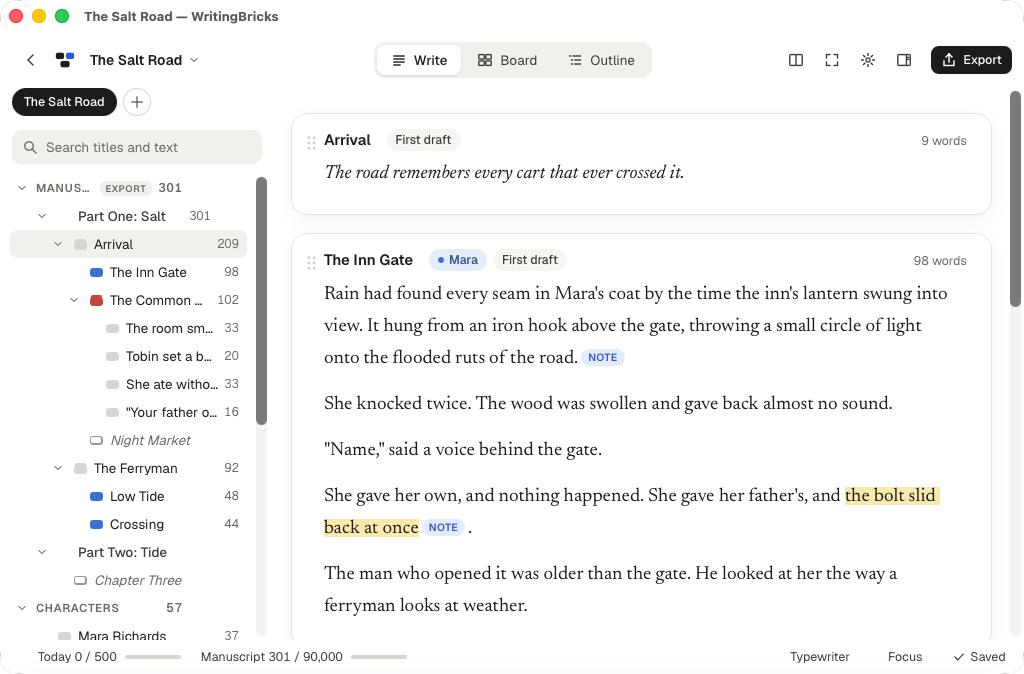
Everything a book or a thesis needs on its way from scattered notes to a finished manuscript.
Split a chapter at the cursor, merge two scenes, or turn a scene into one brick per paragraph and join it back exactly as it was. Drag bricks to reorder them.
Parts, chapters and notes in the binder are folders and files on disk. In a big project, Show only this folder keeps one of them in view.
Select a chapter or a whole part and read every brick inside as one scroll, editing as you go.
Lay your bricks out as index cards with their synopses, or see them in a table with status, label, word counts and fields of your own.
Every brick has notes of its own. A snapshot is kept before your first change each day, and you can compare or restore any of them.
Set a word target for the book, for the day or for one chapter. Full-screen writing, typewriter scrolling and focus mode keep just the text in view.
Word, EPUB, PDF (through printing), Markdown and plain text, in a Book, Manuscript or Plain layout.
Everything saves as you type. Deleting moves bricks to the project’s trash, and Undo puts them back where they were.
A WritingBricks project is just a folder. Each brick is a Markdown file, and the order lives in binder.md, a table of contents you can read anywhere. Nothing is locked in a database or in a format only one app can open.
AGENTS.md and CLAUDE.md, so they know how the folder is organised.Use the Mac app for folders on your computer, the browser for projects that follow you from device to device. Or both.
Works on folders on your Mac, including your Dropbox and iCloud Drive folders, which keep them in sync. No account needed.
With a free account, online projects open on any computer or iPad you sign in on. In the browser you can also open a book straight from your Dropbox.
Yes. The Mac app, the web app and the account are free.
Any Mac with macOS 11 Big Sur or later, with Apple silicon or an Intel processor.
Not yet. On Windows, use WritingBricks in your browser for now, with a free account.
With the Mac app, in the folder you choose, as Markdown files. Online projects are kept in your WritingBricks account, and you can download a copy of one as Markdown files whenever you like.
Yes. Every project has an AGENTS.md and a CLAUDE.md explaining how the folder works, so tools like Claude Code, Codex or Cursor know how to handle the text. WritingBricks picks up their changes as they happen.
Open the folder. WritingBricks asks first, then lists the Markdown files in a new binder.md in the order they are in and adds a short header with an id to each. It never moves or renames them.
Free on the Mac and in your browser.