Write a page. Build a book.
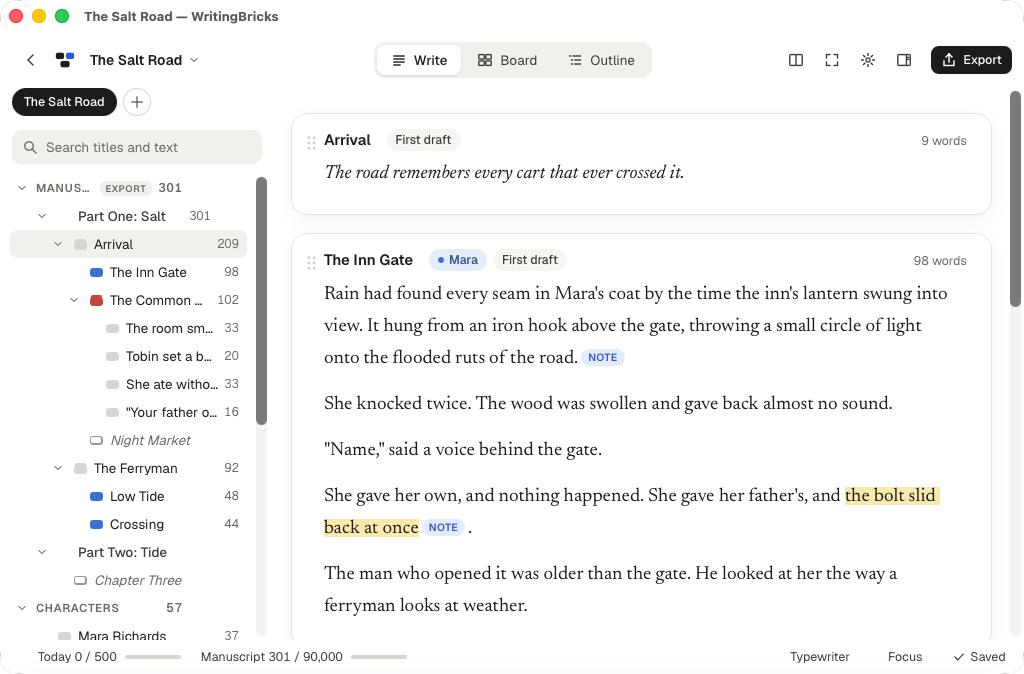
WritingBricks is a Markdown editor for a single document and a writing studio for a whole project. Organise scenes, paragraphs and notes as bricks you can move.
Get the Mac app Write in your browser
Version 0.1.27 for Mac.
Dropbox sync is a feature of the web app at writingbricks.com for licensed users. The Mac app is local-first and has no built-in Dropbox connection. Files in a local Dropbox folder are synced by the separately installed Dropbox desktop app.
Built for long projects
- Move, split and join chapters, scenes and paragraphs.
- Read and edit a whole selection in one scroll.
- Plan with cards, an outline, synopses, labels and word targets.
- Compare snapshots and restore earlier text. Deleted bricks go to the project trash.
- Export to Word, EPUB, HTML, Markdown or plain text. Create PDFs through printing.
- Start from 150 bilingual frameworks and examples, or from a blank page.
Your writing stays yours
A local project is an ordinary folder with Markdown files. Open it in another editor or work on it with an AI tool. WritingBricks does not send your writing to an AI service. On Mac you can open folders managed by Dropbox or iCloud Drive; their own apps handle that folder’s sync.
Write for free. Sync when you need it.
Free, local, no account
Use the Mac app or browser editor without signing up. Free local writing is not uploaded or stored on WritingBricks servers. Browser drafts stay in that browser: export copies before clearing browser data.
Open the local editorDropbox sync: US$19/year
Start with a 90-day free trial, then US$19 per year plus applicable taxes shown at checkout. The subscription renews automatically each year until you cancel in Whop.
Whop provides your licence key when the trial starts. Verify it to connect your own Dropbox. Licence revocation takes effect within about one minute. Documents are stored in your Dropbox; sync requests transit the WritingBricks server without a stored document copy.
Start the trial or verify your licenceQuestions
What happens when I cancel?
A scheduled cancellation keeps sync available until the valid trial or paid period ends. A canceled, expired or otherwise invalid membership cannot sync. Local writing and your files remain available.
Already have a WritingBricks account?
New cloud accounts are closed. Existing accounts can still sign in, open and edit their online projects, export copies, recover access with their recovery key and delete the account. These legacy projects remain on WritingBricks servers. Dropbox sync now requires a valid Whop licence.
Sign in to an existing account
Which computers are supported?
The Mac app supports Apple silicon and Intel, macOS 11 or later. Use the browser editor on Windows or iPad. There is no Windows installer yet.
Scrivi una pagina. Costruisci un libro.
WritingBricks è un editor Markdown per un singolo documento e uno studio di scrittura per un intero progetto. Organizza scene, paragrafi e appunti in blocchi che puoi spostare.
Scarica l’app per Mac Scrivi nel browser
Versione 0.1.27 per Mac.
La sincronizzazione Dropbox è una funzione dell’app web su writingbricks.com per gli utenti con licenza. L’app Mac lavora prima di tutto in locale e non ha un collegamento Dropbox integrato. I file in una cartella Dropbox locale sono sincronizzati dall’app desktop Dropbox installata separatamente.
Pensato per progetti lunghi
- Sposta, dividi e unisci capitoli, scene e paragrafi.
- Leggi e modifica una selezione intera in un unico scorrimento.
- Progetta con schede, scaletta, sinossi, etichette e obiettivi di parole.
- Confronta le istantanee e recupera il testo precedente. I blocchi eliminati vanno nel cestino del progetto.
- Esporta in Word, EPUB, HTML, Markdown o testo semplice. Crea PDF tramite la stampa.
- Parti da 150 strutture ed esempi bilingui oppure da una pagina vuota.
La tua scrittura resta tua
Un progetto locale è una normale cartella con file Markdown. Puoi aprirlo con un altro editor o lavorarci con uno strumento AI. WritingBricks non invia i tuoi testi a servizi AI. Su Mac puoi aprire cartelle gestite da Dropbox o iCloud Drive: le rispettive app si occupano della sincronizzazione.
Scrivi gratis. Sincronizza quando ti serve.
Gratis, in locale, senza account
Usa l’app per Mac o l’editor nel browser senza registrarti. I testi scritti in locale non vengono caricati né conservati sui server WritingBricks. Le bozze nel browser restano in quel browser: esporta una copia prima di cancellarne i dati.
Apri l’editor localeSincronizzazione Dropbox: 19 USD/anno
Inizia con 90 giorni di prova gratuita, poi 19 USD all’anno più eventuali imposte indicate al checkout. L’abbonamento si rinnova automaticamente ogni anno finché non lo annulli su Whop.
Whop ti fornisce la chiave di licenza all’inizio della prova. Verificala per collegare il tuo Dropbox. La revoca della licenza ha effetto entro circa un minuto. I documenti sono conservati nel tuo Dropbox; le richieste di sincronizzazione transitano dal server WritingBricks senza conservarvi una copia dei documenti.
Inizia la prova o verifica la licenzaDomande
Cosa succede se annullo?
Se programmi la cancellazione, la sincronizzazione resta disponibile fino alla fine del periodo di prova o pagato ancora valido. Una licenza annullata, scaduta o altrimenti non valida non consente di sincronizzare. La scrittura locale e i tuoi file restano disponibili.
Hai già un account WritingBricks?
Le nuove registrazioni cloud sono chiuse. Puoi ancora accedere al tuo account esistente, aprire e modificare i progetti online, esportare copie, recuperare l’accesso con la chiave di recupero ed eliminare l’account. Questi progetti preesistenti restano sui server WritingBricks. La sincronizzazione Dropbox richiede ora una licenza Whop valida.
Accedi a un account esistente
Quali computer sono supportati?
L’app per Mac supporta Apple silicon e Intel, con macOS 11 o successivo. Su Windows o iPad puoi usare l’editor nel browser. Non è ancora disponibile un programma di installazione per Windows.